15 Review
In this book, we have focused on the different ways that information can be encoded to create a data visualisaiton and how well information can be decoded from a data visualisation.
This information is helpful in understanding why a data visualisation works well and it is even more helpful in understanding why a data visualisation does not work well.
There are two main ways that we can apply this knowledge: we can use it to evaluate the effectiveness of an existing data visualisation; or we can use it to design a new data visualisation. Either way, the first questions we should ask are:
- What information do we want to decode from the data visualisation? and
- Is that information present in the data (either as raw data values or data summaries)?
We can only hope to decode information from a data visualisation if we have the appropriate data.
Assuming that we have the relevant data, the next questions are:
- What are the data symbols?
- What is being encoded (raw data values and/or data summaries)? and
- What encodings are being used? and
- How many encodings are there?
For each data value or summary and its encoding, we must then ask:
- Can we decode quantitative data values and is the decoding accurate? or
- Can we decode qualitative data values and is there enough capacity?
- Is the encoding congruent? or
- Is the encoding dissonant?
- Can we decode raw data values? or
- Can we decode data summaries?
- Do encodings interact to create emergent features?
- Does each data value or summary have its own data symbol? or
- Are multiple data values or summaries encoded as a single data symbol or visual shape?
- Do the encodings combine to create recognisable visual objects?
Looking beyond the data symbols, we should also identify all text elements and consider the overall design:
- Can we decode absolute data values or data summaries from the text? and
- Can we decode what variables have been measured from the text? and
- Can we decode the main message of the data visualisation from the text?
- Can we decode the structure of the data visualisation? and
- Are the encodings consistent? and
- Is our attention drawn to the most important elements?
Overall, the goal of a data visualisation is to take advantage of the visual system to rapidly and effortlessly communicate data values and data summaries:
- What are you asking the visual system to do? and
- Is the visual system good at that task?
- Do all visual differences correspond to differences in the data? and
- Are all differences in the data represented by visual differences?
15.1 Case study: A letter-value plot
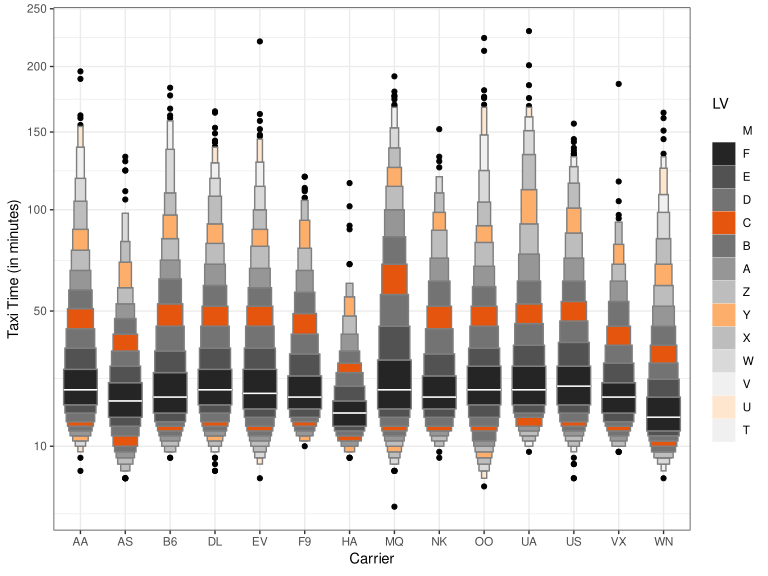
Figure 15.1 shows a letter-value plot of taxi time for over 450,000 flights within the United States, broken down by airline.1 The letter-value plot is an example of a novel data visualisation, so this provides a good opportunity to analyse whether this data visualisation represents an effective encoding of information.2
The purpose of a letter-value plot is to visualise the distribution of a set of data values. The information that we want to decode is about the distribution of the data values: the average value, the spread of the values, the skewness, and so on.
The main motivation for the letter-value plot design is that a normal boxplot produces far too many outliers for cases like this that involve such a large amount of data, as demonstrated in Figure 15.2. Furthermore, alternatives to the boxplot, like violin plots, that fix the problem of too many outliers, are reliant on tuning parameters, like kernels and bandwidths (Section 10.3).
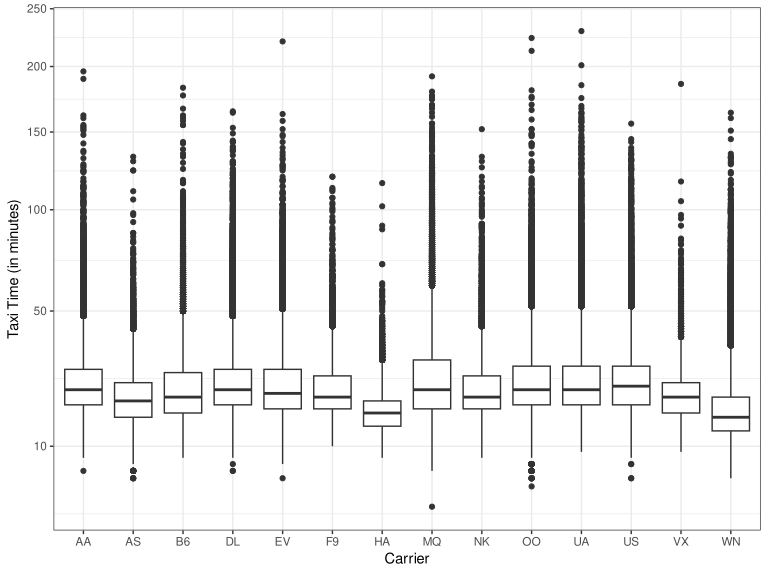
The letter-value plot aims to fix the problem of outliers, while at the same time, like the original boxplot, remain free of tuning parameters. This is achieved by displaying as many letter values as are supported by the amount of data, with only individual data values beyond those limits shown as individual data points.
15.1.1 Letter values
The well-known boxplot is based on the median and the upper and lower quartiles of a data set, but these data summaries are just the first two levels of a more general concept of letter values.3
Letter values are order statistics, where the \(i\)th letter value approximates the quantile corresponding to a tail area that contains \(2^{−i}\) of the observations in the data set. The first letter value is the median, which splits the data into halves (\(2^{-1}\)), the second letter values are the upper and lower quartiles, which leave a quarter of the data in each tail (\(2^{-2}\)), and so on. The amount of data between letter value \(i\) and letter value \((i+1)\) is \(2^{-(i+1)}\). For example, the amount of data between the upper quartile (letter value 2) and letter value 3 is an eighth (\(2^{-3}\)).
The letter values are named M for median, F for fourths, E for eighths, then, following the alphabet in reverse, D for sixteenths, C for thirty-seconds, down to A for one-hundred and twenth-eighths, then starting again at the end of the alphabet, in reverse alphabetic order, Z for two-hundred and fifty-sixths, Y for five-hundred and twelfths, and so on.
15.1.2 Tearing down
We will use the framework that we have developed in this book to analyse the data visualisation in Figure 15.1.
- Encoded information
- The letter-value plot in Figure 15.1 contains data summaries of flight taxi times (for each airline). These data summaries provide information about the spread of data values (for each airline), so we are encoding information that is relevant to our question of interest—the distribution of taxi values (for each airline)—especially if the distribution is unimodal.
- Data symbols
- There are two types of data symbol in a letter-value plot: complex data symbols consisting of multiple rectangles, which we will call letter-value data symbols, to represent the distribution of the data values; and very simple data points, which represent the outliers (if any).
- Encoding visual features
- In Figure 15.1, there is a separate letter-value symbol for each airline, and the airlines (Carrier), which are qualitative data values, are encoded as the horizontal position of the letter-value symbols. The encoding of airline as the position of data symbols is very effective; we can easily differentiate between the airlines.
The taxi times, are encoded as the letter-value data symbols within the plot. However, the letter-value plot encodes data summaries—letter values—rather than raw data values (Chapter 8).4 Consequently, all that we can expect to decode from the plot is information about the letter values, such as the location of specific letter values, plus possibly data summaries of letter values, such as the spread of letter values.
The number of letter values that are displayed (before resorting to showing individual points for outliers) is based on the amount of data values, so there are fewer rectangles for airlines with fewer tax times. For example, airline HA has fewer taxi times than airline AA, so ten letter values are displayed for airline HA, whereas thirteen letter values are displayed for airline AA.5
Each letter value is encoded as the vertical position of the top (or bottom) of a rectangle within the letter-value symbol. The median (letter value 1) is marked as a single white line rather than a rectangle. This is effective for decoding individual letter values for an airline. For example, we can see that one of the letter values for the AA airline is slightly greater than 50.
The depth of each letter value—how many data values lie beyond that letter value—is encoded as the width (length) of a rectangle within the letter-value symbol. For example, the depth of the median is half the total number of data values. This is also an encoding of a data summary. However, the actual encoding is only based on the order of the depth of the letter values, with regular decrements from widest at the median (letter value 1) to narrowest at the final letter value (e.g., letter value 13 for airline AA). In effect, we are encoding a summary of a data summary. Using length for the encoding is effective, but we can only decode ordinal information about the depth of the letter values because that is all that we have encoded. For example, the width of the rectangle that encodes the depth of the fifth letter value (the bright orange rectangle) for the AA airline is just the fourth-widest rectangle. In particular, that rectangle is not proportional to the actual depth of the fifth letter value. There is approximately one thirty-second of the data values beyond the fifth letter value, so this rectangle would have to be sixteen times narrower than the median for the widths to be proportional to the depth of the letter values.
The data density—the number of data values between adjacent letter values—is encoded as the colour of a rectangle. The luminance of the rectangle varies from darkest for the highest density (approximately one quarter of the data values lie between the median and the upper quartile) to lightest for lowest density (approximately one ten-thousandth of the data values between the most extreme letter values). In addition, the hue/chroma of a rectangle encodes a categorisation of the letter values (yet another data summary): every fourth letter value is orange, while all the other letter values are shades of grey.
The luminance encoding of data density only allows us to decode ordinal information about the data density between letter values. Like the widths of the rectangles, the shades of the rectangles steadily decrease upwards from the median and downwards from the median. We can also identify rectangles that represent the same letter value for different airlines by finding rectangles with the same shade in the letter-value symbols for two airlines. This is less effective due to the relatively limited capacity of luminance encoding (Section 6.2). For example, the different shades of grey are much more difficult to identify and compare between different airlines than, for example, the different horizontal locations for different airlines.
The chroma encoding of every fourth letter value is very effective for decoding between those letter values and all of the others. This is essentially an encoding of two groups (orange versus grey). It is also very effective for identifying the same letter value across different airlines. The difference in chroma between the oranges and the greys makes the oranges easy to identify and there are only three different luminances for the orange rectangles, so they are more easily differentiated. For example, it is easy to identify the rectangle for the fifth letter value for all airlines; these are the brightest orange rectangles.
The outliers in a letter-value plot are encoded differently. The individual taxi times for outliers are encoded as the vertical position of data points, with the airline encoded as the horizontal position, as for the letter-value symbols. These allow for very simple and effective decodings. It is even possible to rapidly decode the number of outliers for each airline thanks to the small number of data symbols involved (Section 8.2).
Table 15.1 summarises the encodings that are involved in a letter-value plot and what we can decode from them. There are several effective encodings for both quantitative and qualitative data values, but the encoding of data density and the encoding of letter-value depth both lose some information. Those are quantitative data summaries that have only ordinal encodings. One overall point is that this is quite a large number of encodings for a single data visualisation. This means that the encodings in Figure 15.1 produce a relatively complex data visualisation. There are many visual features changing, which makes each individual encoding in Figure 15.1 more difficult to decode (Section 2.5). Compare this with Figure 15.2 which, for all its faults, is a much simpler data visualisation because it involves fewer changes in visual features.
In defence of Figure 15.1, the encoding and decoding of individual data values and data summaries that we have described, while potentially useful, are not the primary aim of the data visualisation. Any weaknesses of these encodings are less important than how well we can decode the distribution of the data values, which we will come to later.
| Value | Raw/Summary | Type | Encoding | Decoding |
|---|---|---|---|---|
| airline | raw data value | qualitative | position (horiz) | airline |
| taxi time outlier | raw data value | quantitative | position (vert) | taxi time |
| taxi letter value | summary of taxi time | quantitative | position (vert) | taxi letter value |
| letter value depth | summary of letter value | qualitative | length (width) | letter value depth order |
| taxi density | summary of taxi time | quantitative | colour (luminance) | taxi density order |
| fourth letter value | summary of letter value | qualitative | colour (chroma) | fourth letter value |
- Combining encodings
- There is one obvious interaction between the encodings in Figure 15.1. The width of the rectangles (letter-value depth order) and the height of the rectangles (difference between adjacent letter values) together produce the emergent feature of area for the rectangles.
Unfortunately, this area does not correspond to any data value or summary of the data. Letter value depth order multiplied by difference between letter values does not give a meaningful value. This makes Figure 15.1 confusing because the rectangles areas do not decode to anything useful (Section 9.7).6
Furthermore, the implicit decoding of the areas of the rectangles in the letter-value data symbols suggests that, for example, the (darkest) rectangle just above the mean is about five times the size of the highest (lightest) rectangle for the “AA” airline. However, the proportion of the data that lies between the median and the next letter value is actually over sixteen thousand times more than the proportion of the data that lies between the top two letter values. In other words, the area of the rectangles is actually misleading.
There is also a redundant encoding in Figure 15.1 (Section 9.8). Because the order of a letter value is related to the data density order, both the luminance of each rectangle in the letter-value symbol and the width of each rectangle decode to essentially the same information. For example, the bright orange rectangles, which correspond to the data density of the fifth letter value, all have exactly the same width. This has the benefit of providing more than one way to decode information. However, given that we have already identified that there are a large number of encodings in Figure 15.1, this may be a luxury that we can ill afford.
- Non-linear scales
- An extra complication with the encoding of vertical position in Figure 15.1 is that the vertical scale is non-linear (Section 4.7); it is actually the square root of the letter values that are encoded as the vertical position of the tops (or bottoms) of the rectangles in the letter-value data symbols. This makes the decoding of letter values and the comparison of letter values much more difficult because the same physical difference does not decode to the same difference between letter values. For example, for the AA airline, although most of the letter values appear to be similar distances apart, in terms of taxi data values, the letter values are in reality further apart for more extreme letter values.
We have already established that the areas of the rectangles in the letter-value data symbols provide no useful information and are potentially misleading. The non-linear scale only makes that potentially misleading information even more misleading.
- Visual shapes
- The letter-value data symbols encode multiple letter values within a single data symbol, which produces a visual shape (Chapter 10). We have a data symbol that is widest at the median of the data values and narrows towards either extreme.
This allows us to decode useful data summaries about the distribution of the taxi times. For example, the fact that all of the letter-value data symbols narrow more rapidly below the mean than they do above the mean suggests a skewed distribution of taxi times for all airlines (or at least a skewed distribution of the square root of taxi times).
It is also possible to identify airlines that have either similar or different distributions based on similar or different visual shapes. For example, the letter-value data symbol for the HA airline is clearly shorter than the other data symbols, which tells us that the range of taxi times is smaller for the HA airline.
These are examples of effective decodings of data summaries from the visual shapes that are produced by the letter-value data symbols. This effectiveness is important because decoding information about the distribution of taxi times is the main purpose of a letter-value plot.
One caveat is that the changes in the widths of the visual shapes are potentially misleading because they do not narrow anywhere near as fast as the density of the taxi times. In other words, the shape of the letter-value data symbols does not provide an accurate decoding of quantitative features of the distribution of taxi times (actual rate of change), only broad qualitative features (faster or slower change). For example, we can decode whether the distribution is symmetric or skewed, but we cannot decode how skewed the distribution is.
- Encoding encodings
- We have already discussed that the y-axis scale is non-linear. The square root of taxi times, rather then the raw taxi times, are encoded as the vertical position of the tops (or bottoms) of rectangles. This creates the usual problems when it comes to encoding this non-linear scale as tick marks and text labels (Section 4.7). For example, the square-root taxi time of 10 is encoded as a position about two-thirds of the way up the y-axis, which accurately reflects the fact that 10 is approximately two-thirds of the range of square-root taxi times. However, this value of 10 is also encoded as the text “100”.
On one hand, this is a valuable encoding of the value 10 because it saves us the mental effort of having to reverse the square root transformation. If we had encoded this position as the text “10”, then we would be required to perform the mental calculation to decode the raw taxi time of 100.
On the other hand, encoding the square root taxi times as text that corresponds to the original taxi times causes problems because we cannot linearly interpolate between the text values. We can correctly decode the precise taxi time 100 from the text “100”, and 50 from “50”, but it is very difficult to decode any taxi times in between.
The x-axis is more straightforward because it reflects a simpler encoding. Each airline is encoded as the horizontal position of a letter-value data symbol. On the x-axis, we encode each airline as the horizontal position of a tick mark and a text label. A vertical grid line connecting the letter-value data symbols and the tick marks helps to form a strong visual grouping of data symbols with their respective labels (Section 2.7).
However, the encoding of airlines to text is missing a learned decoding (Section 13.3), at least for infrequent travellers internal to the United States of America. For example, not all viewers will immediately decode the text “MQ” to the airline name “Envoy Air”. In effect, the x-axis tick labels only involve an encoding of airline as the pattern of the text. We can only tell that there are different airlines because they use different combinations of letters.
The legend on the right of Figure 15.1 provides information about the colour encoding of the data density between letter values. The data density is encoded as the luminance of a stack of squares, with every fourth square having a different chroma (orange). In addition, the letter values are encoded as individual text characters alongside the squares.
One problem is that there is no learned decoding for the letter values. For example, a letter value of “Z” is not immediately decoded as a meaningful data value. Not all viewers will immediately decode “Z” to a tail area of \(2^{-8}\). As with the x-axis, the encoding only provides us with a different text pattern for each letter value. We can identify that the letter values are different from each other, but little more.
In particular, there is no way to decode the absolute data density from the legend. The luminance of the squares only gives an indication of the data density order thanks to the implicit decoding of darker to more (darker squares are higher density; Section 6.2)
Another minor problem is that the letter values are placed alongside each rectangle, but they really correspond to the boundaries between the rectangles in the letter-value data symbols. For example, the true position of letter value “F” is at the top (or bottom) of the black rectangle in each letter-value data symbol.
Finally, there is no explanation of the width of the rectangles in the letter-value data symbols. There is no legend that explains how the depth order of the letter values is encoded as the width of the letter-value data symbols.
- Encoding structure
- Another problem with the legend in Figure 15.1 is that the squares within the legend are not consistent with the rectangles in the letter-value data symbols (Section 14.3). Specifically, the rectangles in the letter-value data symbols have a grey border, but the squares in the legend have no border. This also makes it harder to match the colours in the legend with the colours in letter-value data symbols because the surrounding colours are not the same (Section 6.3).
A final small inconsistency in the legend is that the luminance of the squares in the legend decrease from top to bottom, while the luminance of the rectangles in the letter-value data symbols decreases from the middle both up and down, with the clearest decrease upwards, from middle to top.
There are also several horizontal grid lines in Figure 15.1. While these can help with decoding individual letter values that lie exactly on a grid line, thanks to the non-linear y-scale, decoding letter values relative to the grid lines is restricted to ordinal comparisons. The large number of grid lines also adds to the overall visual complexity of Figure 15.1 that we discussed earlier.
15.1.3 Building up
Having used the framework in this book to identify a number of problems with the encodings in Figure 15.1, we now attempt to use the information to make improvements to Figure 15.1.
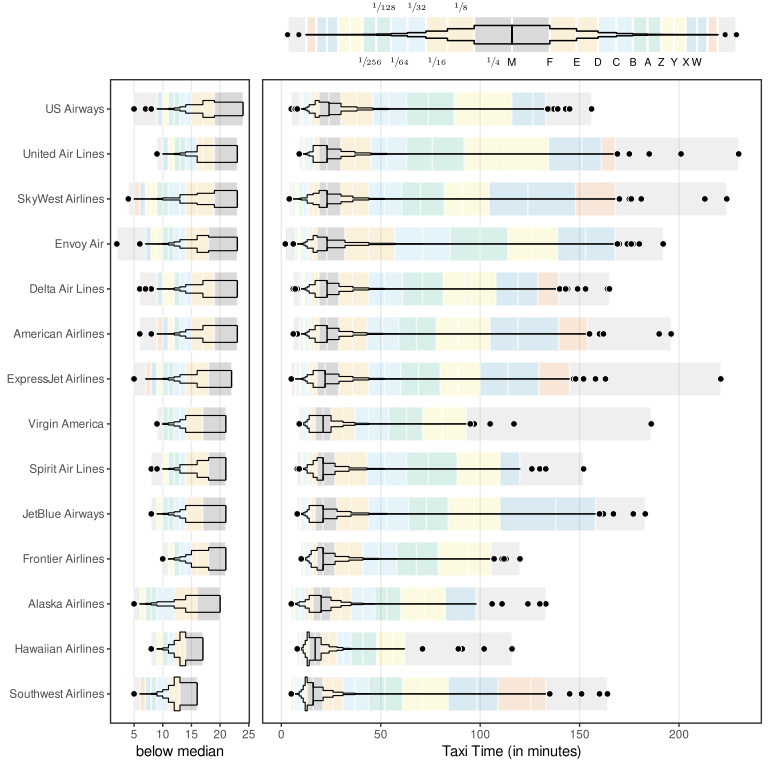
Figure 15.3 shows a data visualisation that is based on the same taxi time data as Figure 15.1, but uses a different set of encodings. One solution to the complexity of Figure 15.1 would be to avoid multiple encodings by producing several, simpler data visualisations for different purposes. For example, one data visualisation that just shows the distribution shapes and another that shows the location of specific letter-value taxi times. However, Figure 15.3 still attempts to fit all of the information from Figure 15.1 into a single data visualisation.
Figure 15.3 does not aim to be an optimal solution, but rather a demonstration that we can use our framework to suggest changes based on deliberate reasoning and that we can provide justifications for those changes.
- Data symbols
- One issue that we identified with Figure 15.1 was the high complexity of the letter-value data symbols, which arises from having multiple encodings within a single data symbol. One option is to have more data symbols, each with fewer encodings.
There are three types of data symbols in Figure 15.3. As in Figure 15.1, there are data points to represent outliers and there is a letter-value data symbol to represent the distribution of taxi times. In addition, there are light-coloured rectangles that represent the individual letter values.
- Encoding visual features
- A number of encodings are the same as before. For example, the airline and taxi times for outliers are encoded as the position of data points, though the axes have been swapped, so that taxi times are now horizontal positions and airlines are vertical positions.
Also as before, instead of raw taxi times, letter-value data summaries are encoded (other than for outliers). However, the encoding of letter values is different. Letter values are encoded as the position of coloured rectangles so that the edges of the rectangles decode to the individual letter values and the width of the rectangles decodes to differences between letter values. There are also rectangles that span the range of the outliers. These encodings are effective for decoding quantitative letter values from the edges and widths of the rectangles.
In addition, letter values (or the spaces between) are encoded as the colour of the rectangles. Pairs of consecutive letter values are encoded to different hues from the Okabe-Ito colour palette (Section 6.9), with light grey reserved for the outlier rectangles. Each hue is repeated twice to reduce the amount of change, while still allowing easy decoding. Although this encoding loses the quantitative information of the letter values, the qualitative encoding is effective for identifying the same letter values across different airlines.
The combined encodings of letter values mean that it is easy to decode and compare individual letter values. For example, we can see from Figure 15.3 that letter value E for Southwest Airlines is approximately 25 minutes and we can see that Envoy Air has the highest letter value B.
- Visual shapes
- The letter values are also encoded as the horizontal positions of a black polygon for each airline. The data density of the taxi times is encoded as the vertical positions of the polygon so that the total area of each letter-value data symbol is the same (i.e., the polygon reflects the density distribution of the taxi times). This means that the narrowness of the polygon properly encodes the amount of data between different letter values. In other words, the implicit decoding of the area of the polygons is not misleading.
The polygon for each airline is of little use for decoding individual letter values, but it produces a visual shape that allows us to decode data summaries of the distribution of taxi times for different airlines (and the coloured rectangles provide a way to decode individual letter values). For example, we can see from Figure 15.3 that all airlines are right-skewed, but Hawaiian Airlines and Southwest Airlines are more skewed than the other airlines.
Detail about the spread of values within the long tails (longer taxi times) can be decoded from the coloured rectangles. For example, Envoy Air has a fatter tail (more longer taxi times) than other airlines because, for each letter value, the Envoy Air rectangle is further to the right than for other airlines (light blues are further right, greens are further right, yellows are further right, etc).
- Non-linear scales
- Another feature of Figure 15.1 that created some problems was the use of a non-linear scale. In Figure 15.3, the encoding of taxi values and letter values to horizontal position is linear. This makes it possible to decode individual letter value and outlier taxi times and compare them between airlines. For example, we can see that the longest taxi time for Southwest Airlines is approximately 50 minutes longer than the longest taxi time for Hawaiian Airlines.
Because the linear scale makes it even more difficult to see the distribution below the median, an extra panel has been added that shows the distribution below the median with a higher-resolution scale. For example, we can see that Hawaiian Airlines and Southwest Airlines have a much more truncated distribution below the median than all other airlines.
- Encoding encodings
- We identified several issues with the labelling of axes and the legend in Figure 15.1 and these have been improved in Figure 15.3.
The airline has been encoded as the full airline names in the text labels on the y-axis. These text labels are full words with learned decodings. This makes it possible not only to differentiate between airlines, but also to decode the actual airline name for each letter-value data symbol. For example, we can see that the bottom airline is Southwest Airlines rather than just WN.
The airlines are also encoded as the vertical position of letter-value symbols, which now run horizontally rather than vertically (just a swapping of axes from Figure 15.1). This is to allow space for the airline labels.
The legend in Figure 15.3 has changed because there are different data symbols and encodings involved, but it is also enhanced in several ways: the legend has a polygon similar to the letter-value data symbol that is used for each airline (but based on a standard normal distribution); the legend has coloured rectangles corresponding to the rectangles in the main plot (but with widths based on a standard normal distribution); the letter values are placed at the correct positions on the borders of the bars; and examples of the data density between letter values is encoded as vulgar-fraction text labels. These changes make the decoding of letter-value names, letter-value positions, and data density all more effective.
As an additional improvement, the airlines have been ordered by median. This simplifies the data visualisation a little because there is a simple monotonic trend in the median lines, rather than a series of increases and decreases. It also makes comparisons easier between more similar airlines because they are now closer together (Section 5.1).
Overall, the most important decoding of the distribution of taxi times is improved because the visual shape of the polygon provides this decoding while not being misleading. This is supplemented by the coloured rectangles, which show more detail about the tails of the distribution. In addition, thanks to linear scales and improved axes and legends, the decoding and comparison of individual taxi times is also more effective.
Figure 15.3 is not perfect, but it provides a demonstration of how we can apply the framework that we have developed. The frameword allows us not only to deconstruct and identify issues with an existing data visualisation, but also to think of ways that we can make improvements to the data visualisations that we create.
Hofmann, Heike, Hadley Wickham, and Karen Kafadar. 2017. “Letter-Value Plots: Boxplots for Large Data.” Journal of Computational and Graphical Statistics 26 (3): 469–77. https://doi.org/10.1080/10618600.2017.1305277.
Tukey, John W. 1977. Exploratory Data Analysis. Reading, MA: Addison-Wesley.
Wickham, Hadley, and Heike Hofmann. 2025. lvplot: Letter Value ’Boxplots’. https://doi.org/10.32614/CRAN.package.lvplot.
This plot reproduces Figure 2 from Hofmann, Wickham, and Kafadar (2017), which was produced with the R package {lvplot} (Wickham and Hofmann 2025).↩︎
In order to incorporate as many points as possible, this analysis just focuses on the default {lvplot} settings that are used in Figure 15.1 and even sinks to the level of critiquing the specific data set (and non-linear scales) that are used in this specific plot. Letter-value plots and the {lvplot} package are capable of a much broader range of results than the specific instance that we focus on in this section.↩︎
The invention of letter values is attributed to Tukey (1977).↩︎
Letter values are an interesting data summary in the sense that each letter value can correspond to a raw data value. In other words, letter values are a subset of the original raw data values, chosen to represent boundaries beyond which a certain proportion of the raw data values lie.
This is not true for all letter values because a letter value may fall between two raw data values.↩︎
The calculation of the number of letter values to display is based on the uncertainty in the estimate of the letter values (assuming Gaussian data). We stop once a 95% confidence interval for a letter value overlaps with the neighbouring letter value.
This calculation is relevant only for the default letter-value plot. Variations of the letter-value plot design allow for different calculations of the number of letter values to display.↩︎
This point is only relevant to the default letter-value plot. A variation of the letter-value plot design involves a different encoding of width so that the area of the rectangle reflects the proportion of the data between the letter values.↩︎